SABSA and enterprise architecture
For an end-to-end operator journey, read the security-assessment case or Android architecture/development case. This capability page explains model structure, supported operations and interchange. Choose direct domain work or layered creation using Methodical workflows before beginning; /sabsa does not automatically open a complete /layered episode.
SABSA support
The SABSA capability treats the architecture as a structured, traceable library rather than one monolithic report.
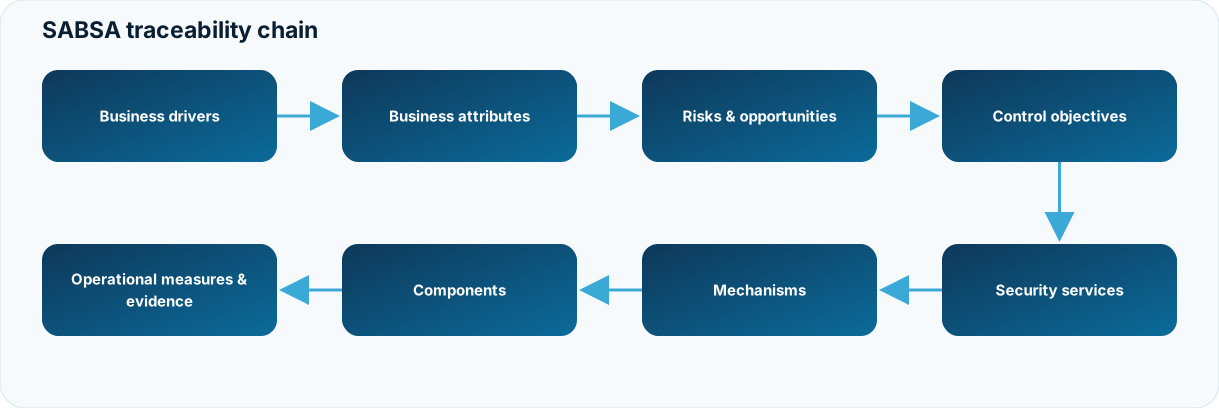
The release supports all 36 SABSA matrix cells as projection-capable architecture content and maintains structured semantic types for the runtime.
SABSA in the 26.10.4 JAI model
SABSA is a profile of the JAI semantic core, not a parallel global truth hierarchy.
A SABSA object can retain its own orthogonal coordinates, for example:
SABSA: Conceptual / Why / objective
JAI:   L3 responsibility while evaluating the objective against policy/risk
The coordinates are intentionally not collapsed into each other. A SABSA layer/question is not inferred from the JAI layer number.
New or updated SABSA source objects in 26.10.4 persist a canonical JAI semantic reference and profile metadata. Legacy libraries remain readable and can be upgraded on write/migration.
Operator request and implementation boundary
In a Claude Code session use the /sabsa and /repository commands shown below; in Codex CLI use $workflow-sabsa and $workflow-repository with the equivalent arguments. For example, ask for the acme-pay SABSA coverage questions and a traceable EA projection. These names are provider commands/skills, not Python shell calls. The provider performs permitted sabsa.py, repository.py and EA bridge operations and should report the resulting object IDs, validation status and open architecture questions. Approval remains bound to the current snapshot and authorised owner; asking the assistant to "approve" does not supply that authority by itself.
Main commands
/sabsa prepare <library>
/sabsa create <library>
/sabsa update <element> <library>
/sabsa review <library>
/sabsa suggest <library>
/sabsa questions <library>
/sabsa approve <library>
/sabsa approval <library>
/sabsa document <library> [as docx]
/sabsa template <library>
Enterprise architecture repository
The EA repository is JSON-based, with ArchiMate/Open Exchange used as an interoperability boundary.
In 26.10.4 its authority is explicitly scoped:
authoritative_for: ea-domain-projection
global_source_of_truth: false
semantic_identity_authority: JAI
That means the repository is authoritative for architecture-domain projection state, lifecycle, views, relationships and related EA governance; it does not create a second global identity for an object that already exists in JAI/SABSA semantics.
/repository validate architecture-repository.json
/repository views architecture-repository.json all
/repository portfolio architecture-repository.json
/repository export architecture-repository.json model.xml
Legacy repository versions 26.10, 26.10.1, 26.10.2 and 26.10.3 are accepted for read/migrate; current writes use the JAI-scoped profile-native model.
SABSA → EA projection
The intended direction is:
JAI canonical semantic identity
        │
        ├── SABSA specialisation / coordinates
        │
        └── EA-domain projection
               │
               └── ArchiMate/Open Exchange interchange
The bridge preserves source specialisation and canonical references so that EA views remain traceable to the semantic origin rather than becoming an independent copy of the truth.
LaTeX documents and editable CSV catalogues
The SABSA conversation workflow uses Markdown by default. Ask for a different format in ordinary language when the audience needs it; this does not change the canonical source or approval rules. For example:
The document workflow selects a viewpoint and presents its reviewed semantic content for the requested audience. Expect output paths, the selected template, source provenance and remaining publication gaps before treating a rendered document as ready for use.
/sabsa document project/sabsa — generate the Logical Security Architecture
in English as LaTeX and PDF from the reviewed entries and authored
narrative. Preserve source provenance, report the template and output
paths, show publication gaps, and keep snapshot approval and rendered-QA
status explicit.
$workflow-sabsa document project/sabsa — generate the Logical Security
Architecture in English as LaTeX and PDF from the reviewed entries and
authored narrative. Preserve source provenance, report the template and
output paths, show publication gaps, and keep snapshot approval and
rendered-QA status explicit.
Ask for Word explicitly for a Word-based review, or request editable CSV catalogues when managing structured entries. The provider should report the chosen viewpoint/template, output paths, actual validation and remaining draft reasons. A format request does not authorise an owner approval.
The following are implementation examples for a maintainer or for inspecting the commands JAI reports; normal users can make the conversation request above:
python3 .ai/runtime/tools/sabsa.py document LIB --out architecture.tex
python3 .ai/runtime/tools/sabsa.py document LIB --layer logical --out logical.tex
python3 .ai/runtime/tools/sabsa.py document LIB --out architecture.pdf --latex
python3 .ai/runtime/tools/sabsa.py document LIB --template-name security-service-catalogue --out services.docx
Writing .tex requires Pandoc. Compiling the controlled LaTeX/PDF edition additionally requires XeLaTeX, its installed packages and DejaVu Serif. Word generation uses Pandoc; LibreOffice or Word is used when independently rendering Word output for visual review. These Office tools are not part of the SABSA TeX/PDF renderer. See publication stack and sandbox prerequisites for format-specific prerequisites. The shared LaTeX template provides a
controlled cover (owner, version, status, scope, approval), contents, running header,
page totals and landscape long tables. Markdown raw TeX is disabled during conversion.
The controlled layout is shared across document views, while each viewpoint's
authored content preserves its own architectural purpose. All existing document
views can use this template.
Word tables receive explicit proportional widths; tables with five or more columns
use landscape sections, with a narrower identifier column and more room for prose.
python3 .ai/runtime/tools/sabsa.py catalogues LIB export --directory CSV
# Edit CSV values, retaining IDs, headers and schema.json.
python3 .ai/runtime/tools/sabsa.py catalogues LIB validate --directory CSV
python3 .ai/runtime/tools/sabsa.py catalogues LIB import --directory CSV
Markdown entries remain authoritative. CSV is an editable exchange projection with
versioned schema, UTF-8 encoding, comma delimiter, LF records, fixed columns per type,
stable ID sorting and SHA-256 export manifest. Relation columns retain canonical
comma-separated IDs; CSV quoting preserves commas and quotation marks. Reused entries
are managed in their source library and are excluded from editable exports. Imports
update existing local IDs only; use new to create entries and export again. Missing,
new or duplicate IDs, changed schemas and multiline metadata are rejected. Validation
checks a temporary library before any source mutation. Import preserves entry bodies
and native metadata, rolls back write failures, and invalidates prior snapshot approval
through the existing content hash. The export manifest fingerprints the original
export; it is not an approval of subsequent CSV edits.
Rollback: restore changed canonical entries from version control; generated CSV, LaTeX, PDF and DOCX can be regenerated. No owner approval or publication gate is implied by successful rendering or CSV validation.
Use --layer contextual|conceptual|logical|physical|component|service-management for an individual matrix layer; operational aliases service-management. Each layer document includes its six matrix questions, local elements, source/basis, whole-library approval status and business traceability context.
Authored English viewpoint documents
Each SABSA layer has its own document profile with substantial authored chapters, complete element specifications and source bodies, responsibilities, evidence, review and typed business justification paths. The logical viewpoint describes services, policy and information access; the component viewpoint describes engineering and verification; operations describes measurement and assurance. These are semantic viewpoints rather than a shared questionnaire dressed as a publication.
| Viewpoint | Publication focus |
|---|---|
| Contextual | Business context, dependencies and security governance |
| Conceptual | Measurable attributes, security concepts, objectives and trust |
| Logical | Security services, policies, information and access |
| Physical | Mechanisms, deployment boundaries and control execution |
| Component | Component specifications, configuration and verification |
| Service Management | Operations, measurement, evidence and improvement |
Run sabsa.py narrative-init LIB --layer logical, write the chapter files under
narratives/logical/ with basis/source/author/language provenance, then use document
--layer logical. Missing prose, source scaffolding and unresolved traceability stay
visible as authoring gaps. Narratives participate in source citations, validation and
snapshot approval; changing them invalidates prior approval. Authors supply reviewed
professional English text, preserve original sources and cite translations. The
renderer preserves canonical meaning and does not automatically translate content.
The complete contract is in runtime/sabsa/publication/README.md. Generate the
populated fictional six-viewpoint example with
python3 .ai/runtime/tools/sabsa_publication_demo.py --out DIR --render.
For guided use, follow assessing a deployed system or keeping Android development aligned. Both explain why to take each step and how to distinguish source-backed results from proposed next work.
Why this matters
Organisations often struggle to keep security architecture, enterprise architecture and published documents aligned. The 26.10.4 profile model gives each subsystem a clear scope while preserving stable identity and traceability across them.